A mouse tracks physical motion. It sends data to the computer, which then draws output on the monitor that reflects this motion. We all desire for this output to reflect the physical motion accurately with low latency. For this purpose, it is necessary to consider everything in between the mouse sensor and the monitor:
- the MCU which reads sensor data
- for a wireless mouse, the receiver’s MCU(s)
- the USB host controller that polls the wired mouse’s MCU or wireless receiver’s MCU
- on the PC, the operating system kernel
- the game or application that reads mouse data periodically
Between the sensor, which periodically captures frames, and the monitor, which periodically displays content, these 4 or 5 intermediate stages have their own timing cadences. At each stage, there is the possibility for latency and timing jitter to be introduced.
This article concerns SensorLock: our system for minimizing timing jitter and latency for all the stages that can be controlled within the mouse. This is achieved by synchronizing the USB polls, MCU-MCU wireless communication if applicable, MCU-to-sensor SPI communication, and sensor frame captures. Not only are these synchronized, but also their relative timings (phases) are adjusted to completely minimize latency, exactly as described previously in the firmware article.
In other words, this is our way to achieve the same result as Razer’s Frame Sync, but without requiring the hardware of the Viper V4 Pro. SensorLock works on at least the PAW3950 and PAW3955, and likely their variants as well. It is not a backport or a reverse-engineered copy of Frame Sync, since it works differently internally. The end result is similar: all the periodic activities on the mouse, sensor frame capture, processing, reading by the MCU, etc., run phase-locked to the USB polls. The most challenging part of this is to control the timing of the sensor frames. Hence the name SensorLock.
Who’s behind SensorLock?
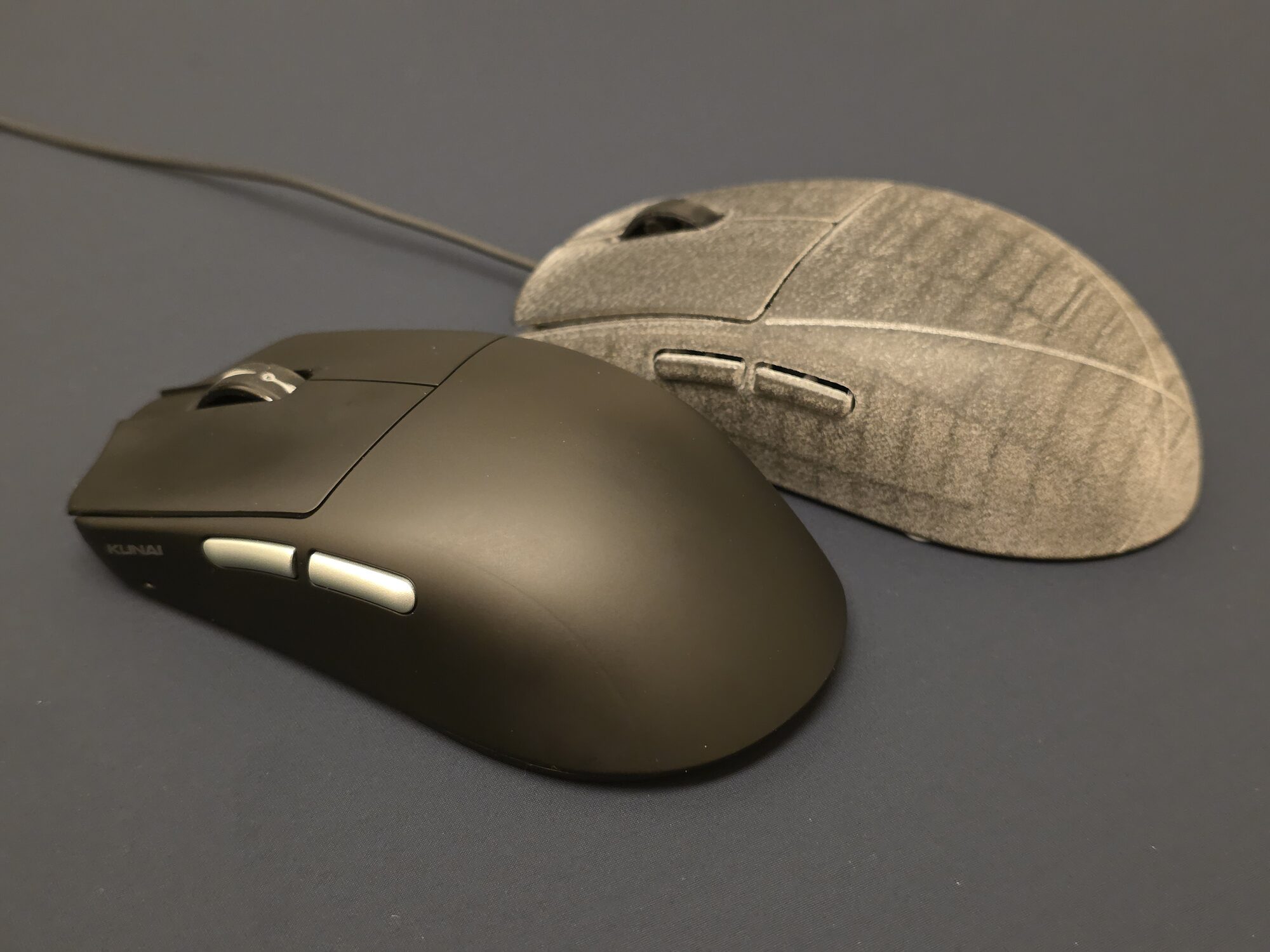
This system we call SensorLock arose from a joint discovery between tekkusai and XBAB Tech. We first announced this with a short promotional video in Oct 2026. Some were surprised to see tekkusai’s involvement, as his work on his mouse, particularly its firmware, was not known publicly at that point. This is worth clarifying.
tekkusai has been working independently on firmware for his mouse, Kunai, since before our first interaction. I’ve assisted indirectly, by providing guidance and performing tests. In the process of discussing our firmwares, we learned that we had both unsuccessfully attempted to achieve sensor frame timing control in our respective mice. Based on the information we exchanged about our attempts to achieve this, tekkusai discovered and shared a method that controls sensor frame timing beyond setting a framerate. Exploiting this method and developing a fully reliable system, however, took us a lot of work, since it is incompatible with the sensor’s behavior when changing modes. In particular, with early versions of SensorLock, tracking on certain surfaces would cause the sensor to completely stall.
SensorLock is a collaboration enabled by our shared desire to push the limits of mouse performance beyond what’s written on datasheets. It is truly a joint project - this would never have happened without either of us. More importantly, it required our mutual willingness to freely discuss and exchange our knowledge and discoveries.
The primary issue: microstutters (temporal aliasing)
Our headline in the first promotional video was that SensorLock has lower latency (by over 160 μs) than the Viper V4 Pro’s implementation of Frame Sync. This is true, but perhaps our emphasis was misplaced. The most important benefit, of either system, lies in eliminating microstutters in the mouse itself.
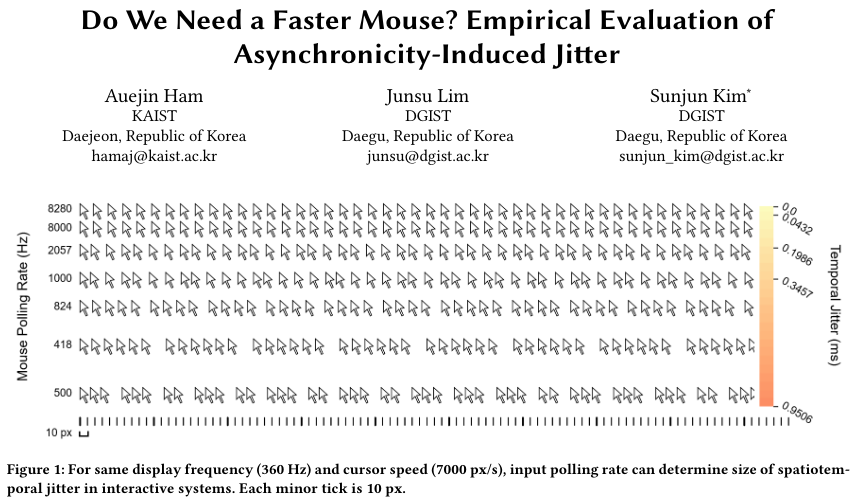
Microstutters occur whenever there is a timing mismatch between any two stages in the chain of events between the sensor capturing physical motion and the monitor displaying a frame. Using a 125 Hz mouse on a 60 Hz monitor is arguably the most noticeable scenario that many have encountered: in smooth motion, the cursor will stutter 5 times a second. The reason is that in one second, if the monitor updates the cursor 60 times, but the mouse sends motion data 125 times (every 8 ms), 125/60 = 2.083 is not an integer. Therefore, some cursor updates will display motion corresponding to 2 * 8 ms of data, while others will display motion data corresponding to 3 * 8 ms of data.
The Blur Busters Mouse Guide, though dated, provides pictures that visualize this. This 2021 paper discusses these microstutters in more detail:
The same effect can happen inside the mouse itself, on a much finer timescale, due to the mismatch of sensor framerate to USB report rate. This is easiest to see in plots of mouse motion counts against time. This overclock.net thread contains some examples. The firmware article discussed this too. The appropriate technical term for this effect is (temporal) aliasing.
Here is an example of aliasing. Here the sensor framerate is approximately 19800 fps, with USB reports at 4000 Hz.
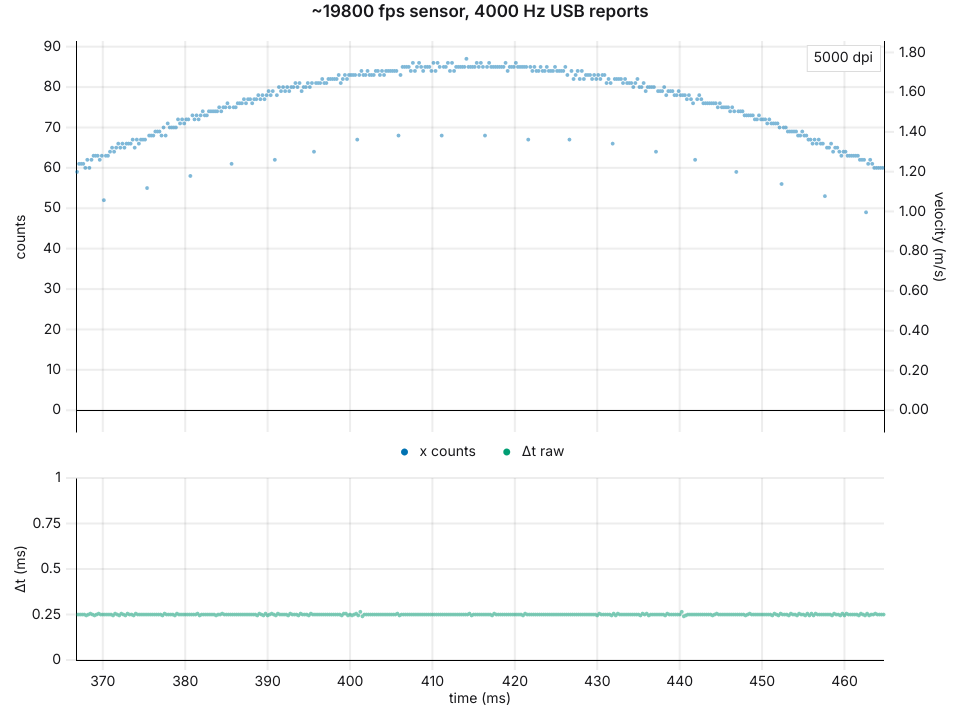
The x counts periodically dip, every 5 ms, to exactly 20% lower than the main trend. (19800 Hz is 200 Hz lower than 20000 Hz, 1/200 Hz = 0.005 s = 5 ms.)
One solution: Motion Sync
tl;dr: Motion Sync is widely misunderstood to mean synchronization of SPI with USB. It’s not. SPI synchronization was done years before the term was created. It’s actually a method that eliminates aliasing by buffering motion data and requires SPI synchronization. Source: PixArt’s patent.
In 2019 Razer released the Viper Ultimate. Razer advertised a new feature: “Motion Sync”. They described it as synchronizing the timing of SPI reads (MCU reading the sensor data) with USB polls. This is half the story. And this half of the story was actually first done (AFAIK) by Logitech back in 2014 with the G502 and their subsequent wired mice. It was also achieved on a wireless franken-mouse by myself in 2016. In that thread, you can find, for instance, oscilloscope screenshots comparing the timing of USB data to SPI communications for the G303:
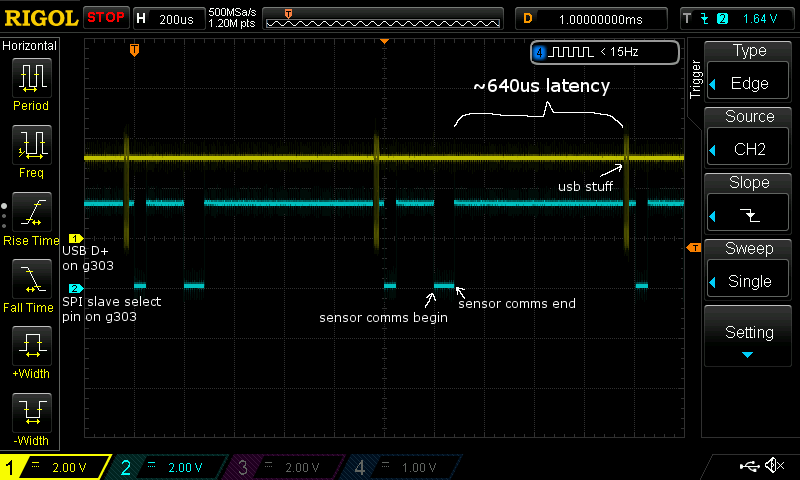
If you’ve never seen an oscilloscope before, time is on the horizontal axis, and signals are the colored traces. In this screenshot, the SPI communication between MCU and sensor is consistently timed right after each burst of USB traffic. Seems to be what Motion Sync advertises, right?
But Motion Sync is more than that. As mentioned previously, as long as sensor framerate and USB report rate are not matched, there will be aliasing that shows up in plots. Wired Logitech mice from the 2010s show this, as seen in the thread. But when Motion Sync is enabled, aliasing is completely gone. Here’s an example from pzogel’s Viper 8K review:
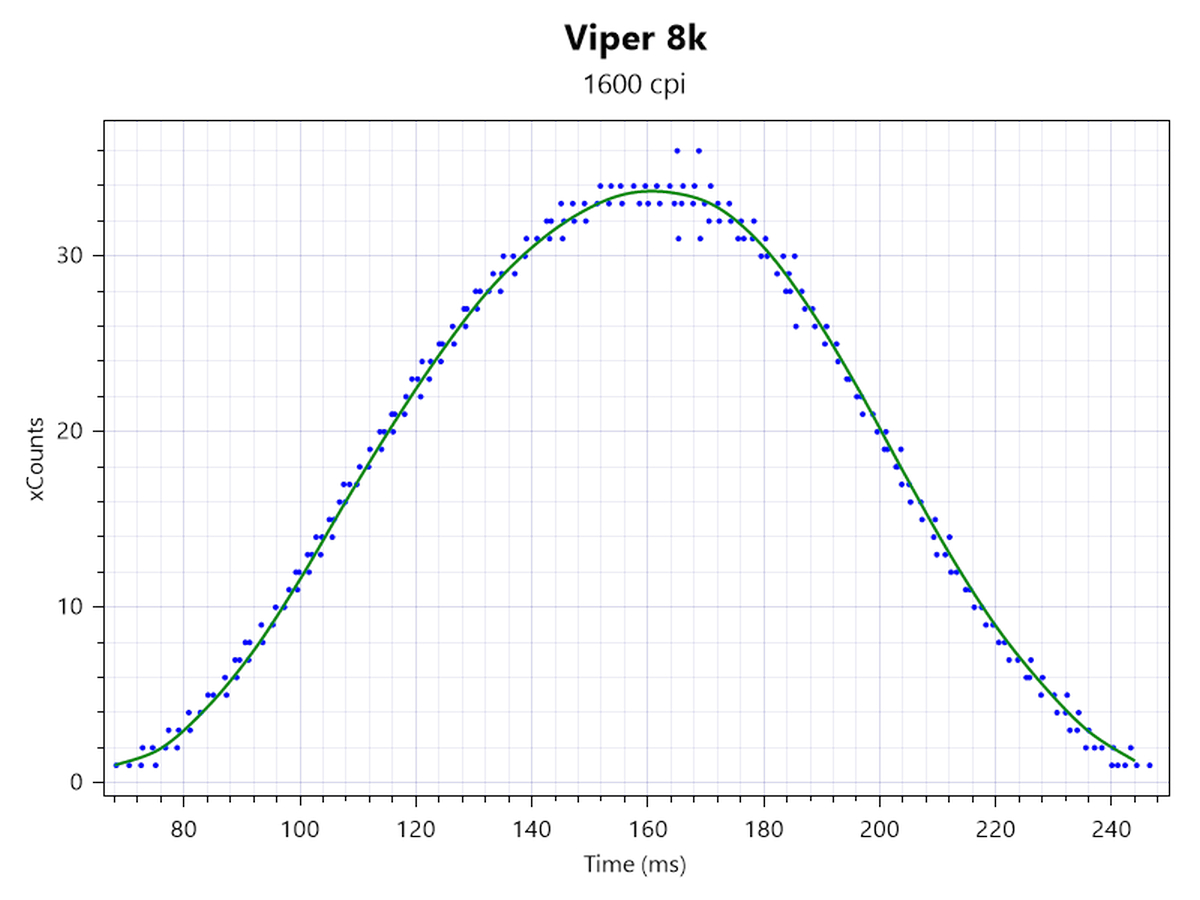
How does this work? The common understanding, perpetuated by Razer’s marketing, is that those aliasing patterns in the plots are eliminated by synchronizing SPI and USB. But the G502 and wired Logitech mice did that already years ago, and always showed aliasing. Furthermore, Motion Sync has no impact on sensor framerate (easily verifiable on oscilloscope).
Here are example plots of the XA25 with and without Motion Sync:
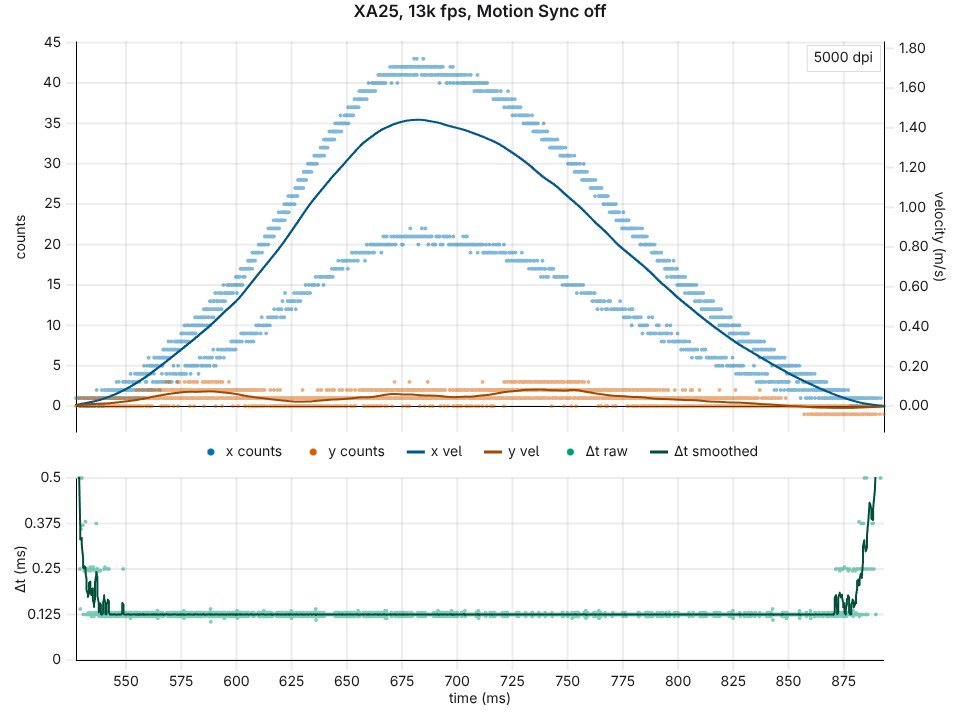
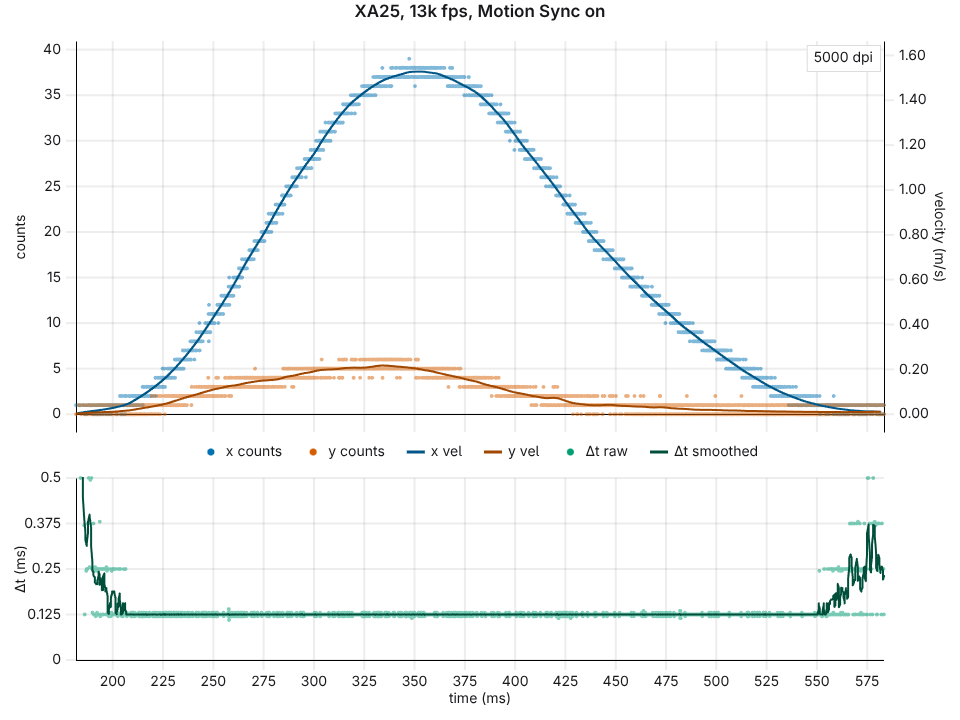
So what’s going on? How is aliasing eliminated without affecting framerate? For a long time I had speculations that there must be some division arithmetic happening to the data, and my speculations were confirmed upon discovering this patent, which was filed in Dec 2019 shortly after Viper Ultimate launched.
Motion Sync is an algorithm that relies on periodic SPI reads from the MCU. It is not simply synchronizing SPI, however. The goal is to make every SPI read return as much motion as the length of the SPI read interval. This length is, in general, not an integer multiple of the frame period.
Here’s how it works. Consider a sensor running at 20000 fps, with frames finishing at 10 μs, 60 μs, 110 μs, 160 μs, etc., and the MCU reading at 8000 Hz: at 0 μs, 125 μs, 250 μs, etc. When the read at 125 μs comes, the latest frame is from 110 μs, so the sensor doesn’t know the motion up to 125 μs yet. It waits for the next frame at 160 μs. At that point it has the motion from 0 to 160 μs, and it multiplies the accumulated data by 125/160 to represent motion from 0 to 125 μs. This is then sent on the next read, at 250 μs. The remaining 35/160 is carried over to the next interval at 375 μs, which also contains motion from 125 to 260 μs, of which 125/135 is kept, and so on.
The result of this scaling is that every SPI read gets 125 μs of motion, 2.5 frames’ worth, instead of alternating between 2 and 3 frames.
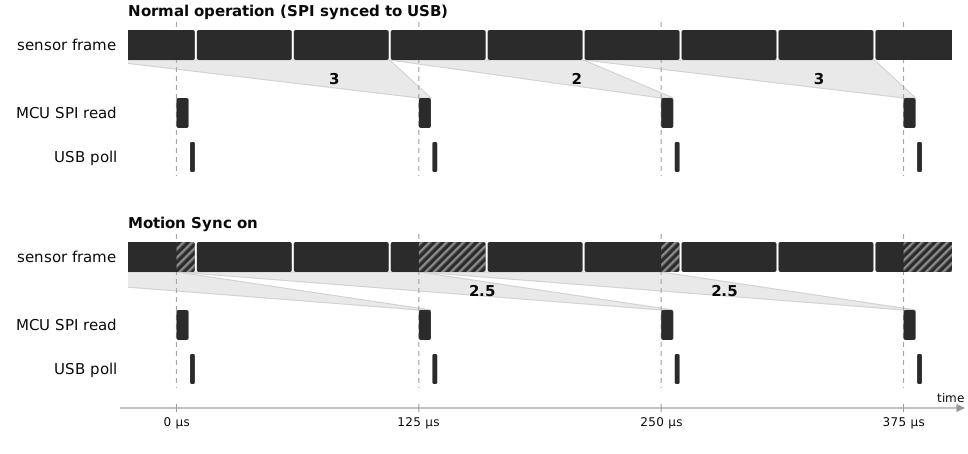
The diagram simplifies this a bit by chopping up only the frame that straddles each read. What’s actually scaled is the whole sum of the frames since the previous read.
Notice the timing. The motion from 0 to 125 μs is only known at 160 μs, after the read at 125 μs has already happened. It goes out with the read at 250 μs, by which point the newest motion in it is 90 μs old. Without Motion Sync, the read at 125 μs returns frames up to 110 μs, which is only 15 μs old. So, Motion Sync adds most of a full polling interval of latency.
This matches the perception in the community that Motion Sync adds latency. Part of this stems from push-two-mice-together style tests by pzogel (example) that find a latency penalty with Motion Sync (despite the limited accuracy of this method!), and part of this stems from subjective anecdotes. The best latency data I’m aware of are piaknow’s recently published measurements. These show that the mice with Motion Sync forced on have a substantially higher latency (particularly when using polling rates below 8000 Hz), which is consistent with a delay of about one USB cycle.
A lower-latency way
Before finding the patent, this is what I assumed Motion Sync does. It’s not what the patent describes, but it would also eliminate aliasing with even less latency.
Briefly, my thinking was that the sensor does the following: every time an SPI read comes, it replies with accumulated motion data since the previous SPI read, BUT stores up part of the latest (fully processed) frame’s data for the next SPI read. The goal is to ensure that the data sent to the MCU corresponds to the same amount of motion as the length of the SPI read interval. For example, consider a sensor running at 20000 fps (50 μs) with USB reports at 8000 Hz (125 μs). This kind of fractional processing allows 20000/8000 = 2.5 frames of data to be sent on every SPI read, corresponding to 125 μs of motion.
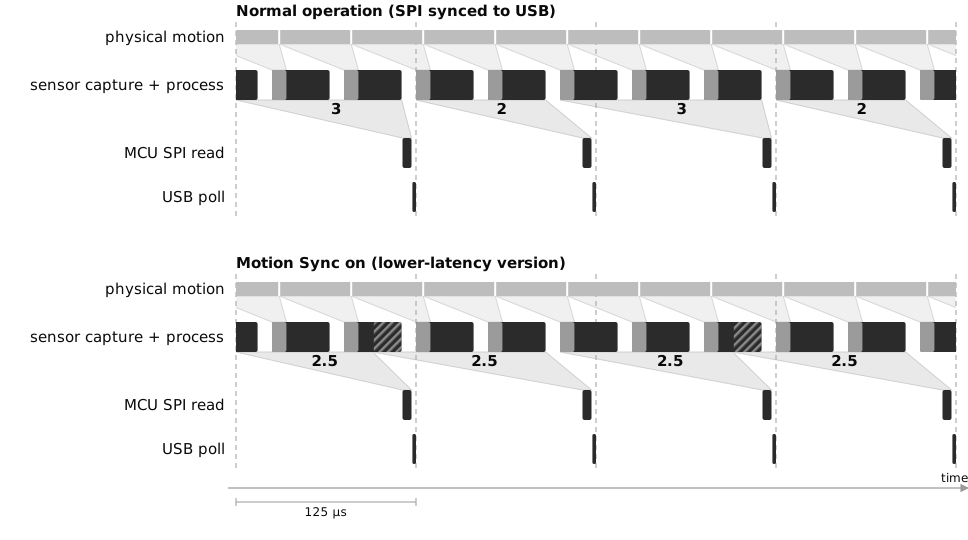
For the scheme to work, at the very least, part of the most recent frame of data must be saved for the next cycle. This adds a little bit of latency, although definitions get a bit murky here since the data is being manipulated. Roughly speaking, it introduces half a sensor frame’s worth of delay. One way to think about it is that sometimes almost all of the most recent frame is sent immediately, other times almost all of the most recent frame is saved for the next cycle.
In any case, Motion Sync is obsolete now. With Frame Sync or SensorLock, there’s no need to chop up data into fragments and do any kind of buffering and processing.
Frame Sync
Frame Sync on the Viper V4 Pro avoids this complexity by synchronizing sensor frames to the SPI reads, automatically.
It’s not as simple as setting the framerate to exactly 8000 Hz. Even if you do so, there’s bound to be drift. The sensor’s clocked by an internal RC oscillator which varies (single-digit %) with temperature and other miscellaneous factors.
Rather, the Viper V4 Pro’s sensor implements a phase-locked loop to control the timing of frame captures. Here’s a screenshot from Razer’s marketing material.
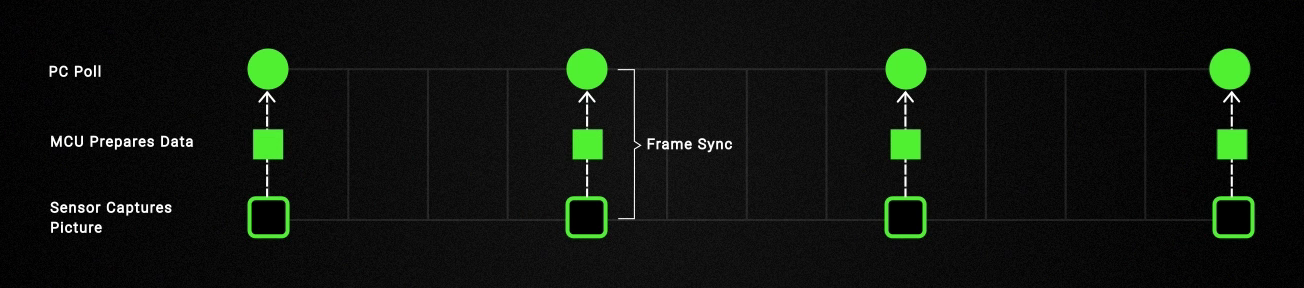
Indeed, aliasing is gone on the Viper V4 Pro - see the clean plots in pzogel’s review. Synchronization of sensor frames to USB was directly confirmed by piaknow with a photodetector on his oscilloscope.
The actual data, of course, is not as pretty as the marketing figure, which implies that the data are read by the MCU and sent over USB immediately. The reality, as captured on an oscilloscope, involves several stages of delay. Our HP 54846A oscilloscope (that runs Windows 98!) has just enough bandwidth that we can directly see the timing of radio packets on the air, by placing a 2.4 GHz antenna next to the mouse. Here’s a screenshot that shows everything from the sensor capturing the frame to the corresponding USB transmission.
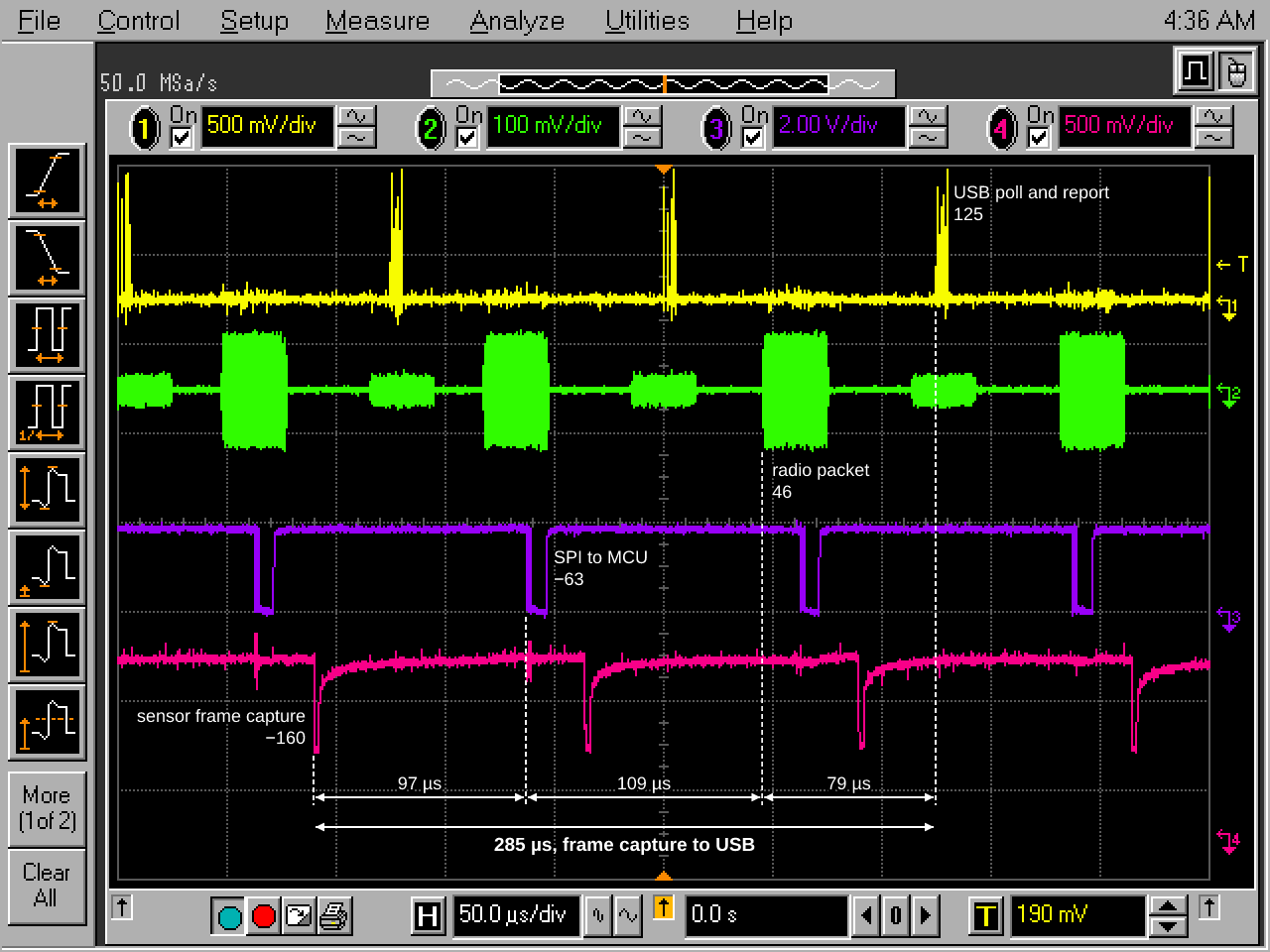
In total, there’s 285 μs that elapses between each frame capture and the corresponding USB transmission for the Viper V4 Pro in wireless mode. That’s over two full 8k 125 μs cycles. Some of this is unavoidable of course - it takes some tens of μs to process the frame’s data, some tens of μs to transmit over radio, etc.
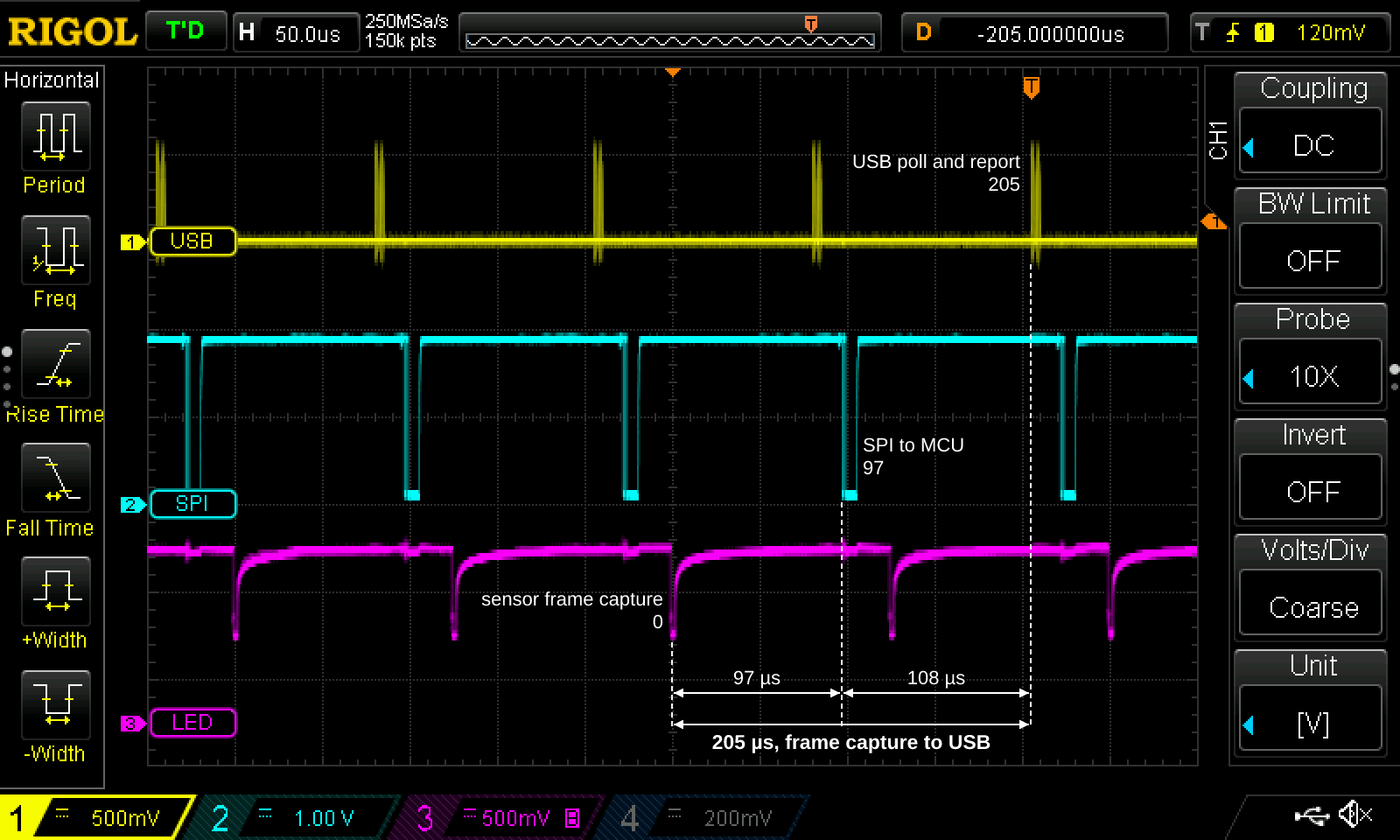
This is improved to 205 μs when wired. No need for the 54846A here; our Rigol DS1054Z suffices:
SensorLock
SensorLock achieves the same thing as Frame Sync: sensor frame synchronization with USB polling. The result in plots is similar: clean data with no aliasing. At 8k, Every USB report carries the data from precisely one sensor frame.
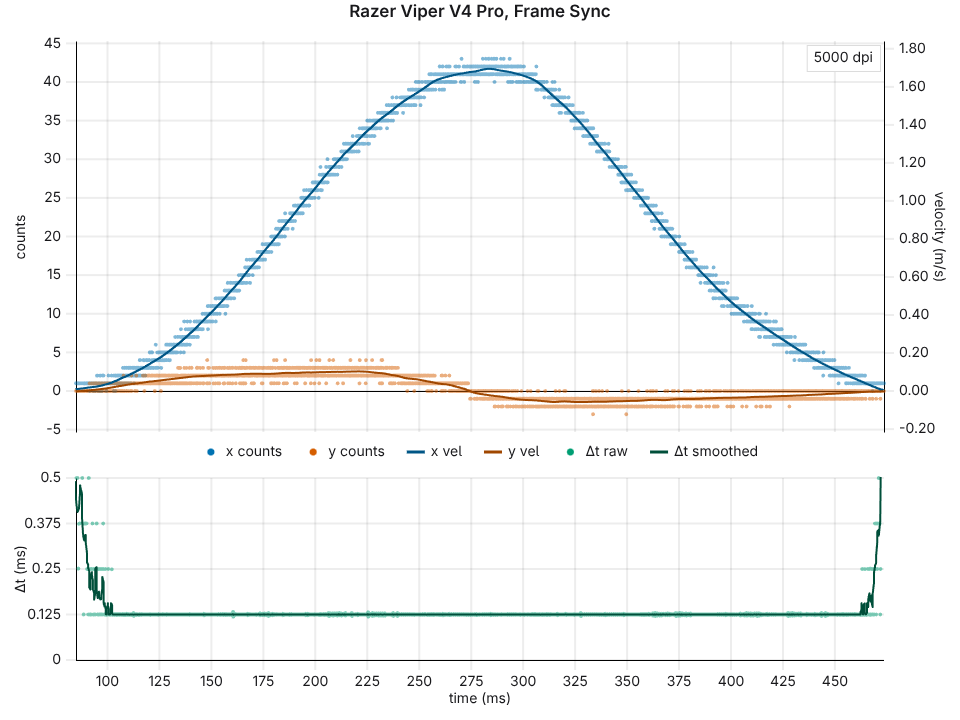
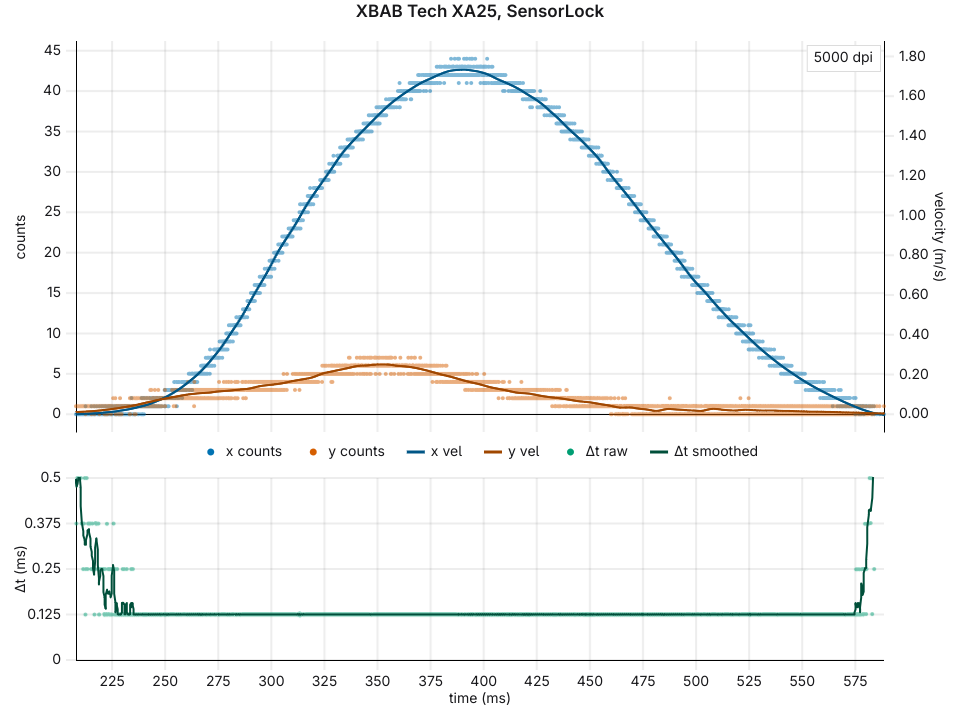
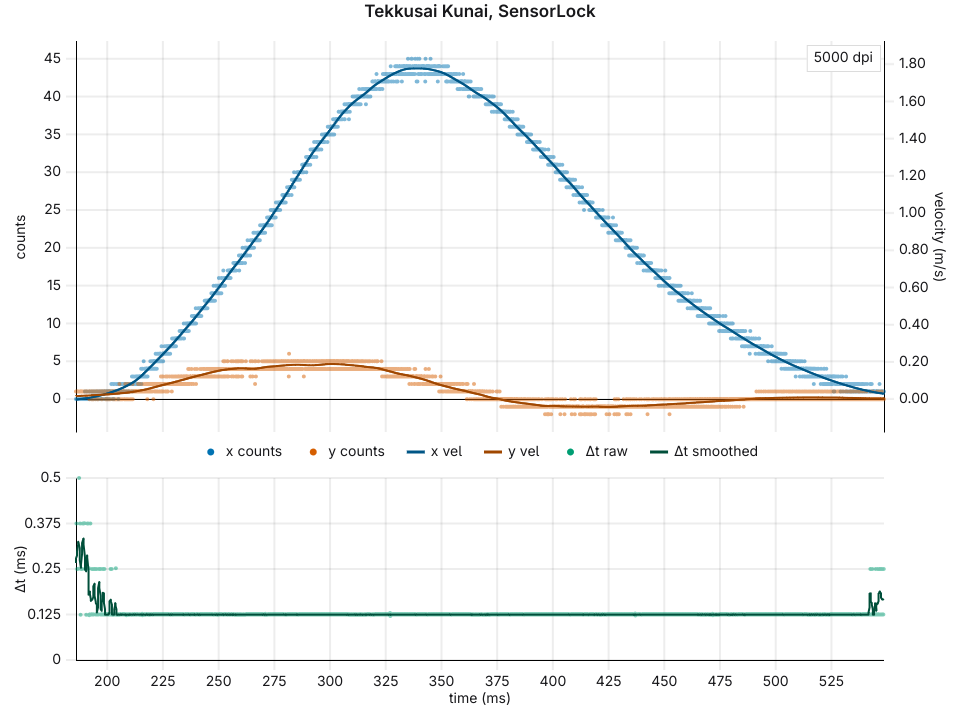
SensorLock on the XA25 and the Kunai achieves frame synchronization with the PAW3950 and PAW3955, respectively. These sensors are older than the Viper V4 Pro’s sensor (which is likely exclusive to Razer until at least 2028, given the historical cadence of Razer’s sensor exclusivity). As far as I understand from probing around, Frame Sync works through additional hardware on the Viper V4 Pro’s sensor that detects the timing of SPI reads and automatically schedules the next sensor frame capture. SensorLock works differently since the PAW3950 and PAW3955 do not have this feature. We’ll share more details in the future on the exact operation and mechanism of SensorLock. For now, it suffices to say that we discovered a way to control the timing of sensor frames in firmware. In this sense, it is not a clone or reverse-engineered copy of Frame Sync, though it achieves the same result: one frame per USB poll.
The latency from frame capture to USB data is very well optimized in the implementations of SensorLock in the XA25 and Kunai. The wireless Kunai has only 80 μs between each frame capture and corresponding USB poll.
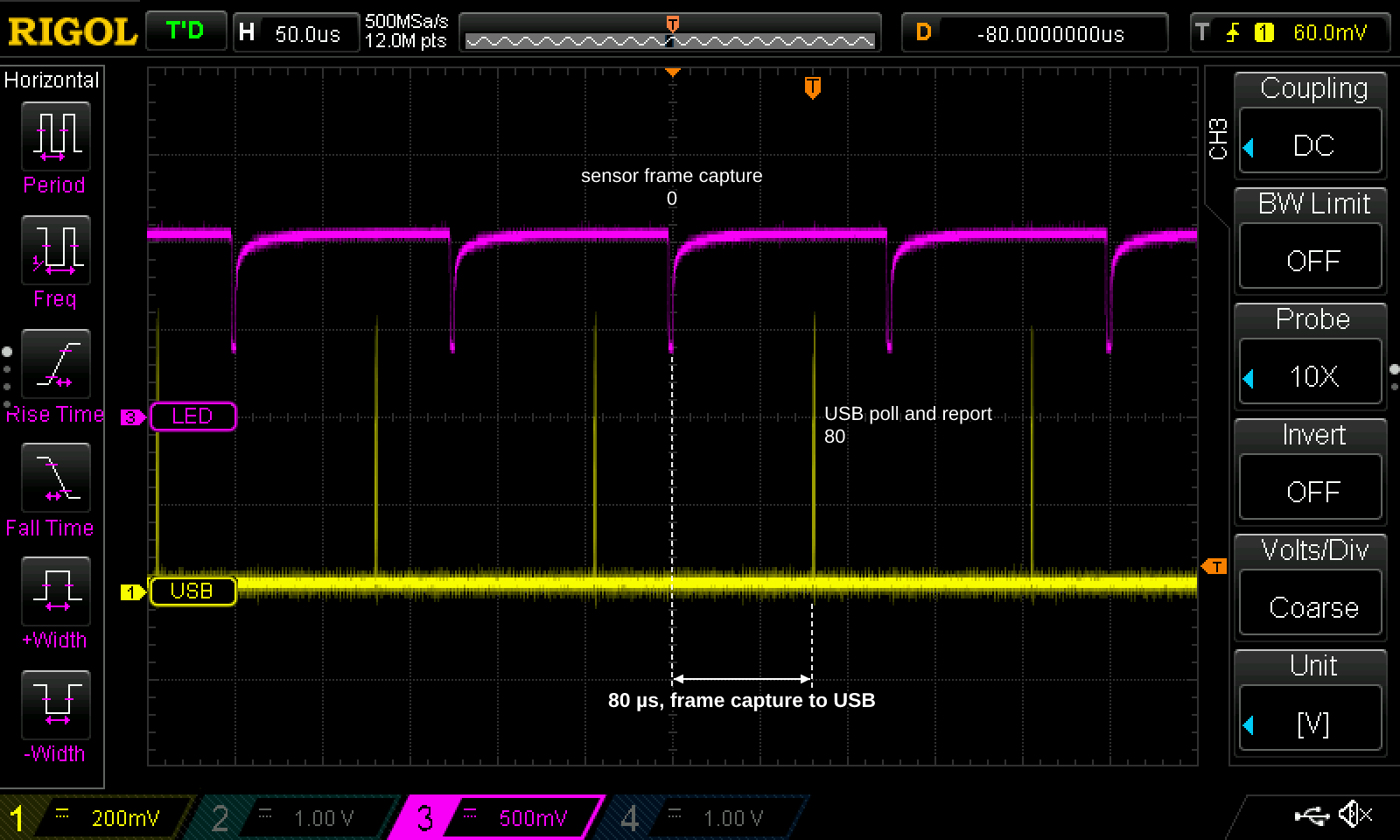
I’ve verified separately that the SPI read and radio packets lie in between this 80 μs period. The wired XA25 has just 37 μs.
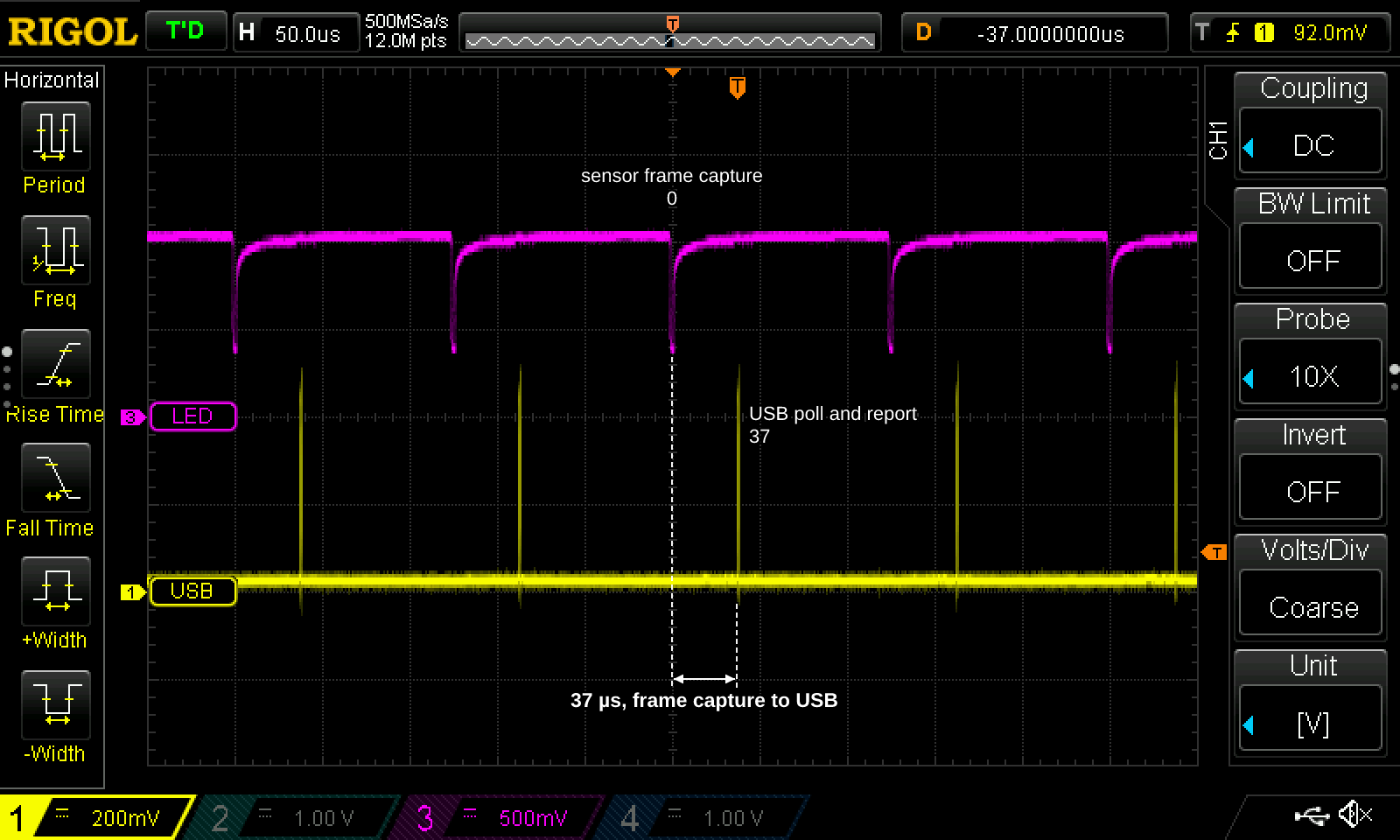
Since it takes about 28 μs for the sensor to process data upon completion of each frame capture, and about 5 μs to read the motion data in an SPI burst read, this is, to within single-digit microseconds, the absolute minimum possible motion latency for a wired gaming mouse using high-speed USB and current PixArt sensors.
Other benefits
Power consumption
8k framerate of course consumes less power than 13k or 20k framerate modes. So is Frame Sync responsible for the well-received battery life of the Viper V4 Pro? I have not yet performed a quantitative analysis, but as I understand it, Frame Sync is not the only source of the battery life improvement in the Viper V4 Pro over older Razer mice. The other factors are:
- new MCU (Airoha)
- new firmware and radio protocol
- 55nm node process. We don’t know what node older sensors were on, but this might be the main factor.
SensorLock definitely reduces power consumption and improves battery life over constant 13k or 20k framerate modes, but we haven’t measured exactly how much. I expect tens of percent overall, considering that on a modern wireless mouse, the sensor and MCU consume comparable amounts of power.
Lower noise?
This is speculative. But consider the simple scheme where motion deltas for each frame are computed purely from comparing against the most recent previous frame. Since these calculations are not perfect, there is noise. In this simple scheme of sensor operation, higher framerate leads to more noise/less accuracy over the same period of time, since more noise is added together.
Again, this is a speculative simplification of the actual operation of a sensor. If true, 8k framerate should be superior to 13k and 20k framerate modes in accuracy due to having less noise.
Is any of this noticeable?
In the absence of compelling evidence, I will not take a stand on whether any of the performance benefits of SensorLock are perceptible or not. But we are in the process of trying to understand. The XA25’s control panel contains an ABX blind testing page that will allow anyone to evaluate if they can reliably distinguish two settings in a blinded experiment:
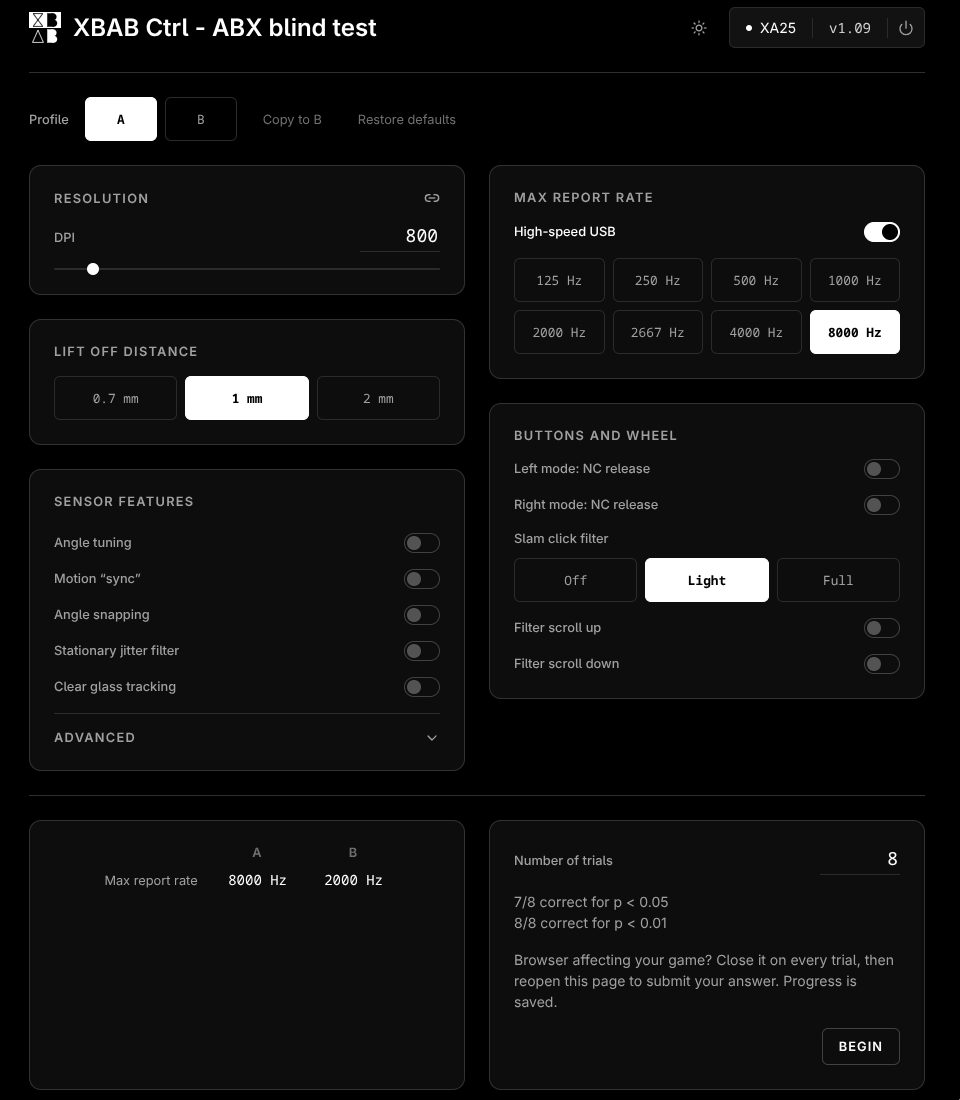
This will be updated once the SensorLock firmware update goes live for the XA25.
Of course there are many factors to this: the evaluation scenario (game or desktop), framerate, monitor, other sources of timing jitter, and one’s own sensitivity. p-hacking is also of course a concern for such tests. For an alpha of 0.05 (i.e. p < 0.05 result), anyone who repeats a test about 20 times would be expected to pass once by chance alone.
But regardless of whether anyone can detect the performance advantages of Frame Sync or SensorLock, it’s still an objectively better way to do things. Are the tens of microseconds of improvement significant? Well, the difference between 4k and 8k USB report rate is also a matter of ~100 microseconds, so if it’s worthwhile to do 8k, I believe that it’s worthwhile to do SensorLock as well. With 1000 Hz and higher monitors on the horizon, sub-millisecond timing effects, whether latency or jitter, will be increasingly resolvable. SensorLock eliminates aliasing at the very root, the sensor framerate, and hopefully one day we’ll see a similar level of attention paid to the rest of the chain: OS-level effects, game framerate fluctuations, etc.